Installation, activation and update InstalSystem 5 package
(Redirecționat de la HelpRedirectPageHS21)
DESCRIPTION
Installing the package, running the application and performing the functions Activare and Actualizare enable preparing the working environment. This article also describes how to ask for the licence number using the InstalSystem Manager 5 (this feature is available in selected package configurations).
LOCATION IN THE PROGRAM
- Installation - during installation follow the indications of the installation assistant. Installation is performed in two steps. InstalSystem Manager 5 is installed in the first step. The remaining part of the application is downloaded during Actualizare, which is part of the installation process and which must be carried out to complete the installation.
Important: Prior to installing, it is necessary to verify that the computer meets the hardware requirements: Technical requirements. - Activare - verifies the user's right to the software. The licence number must match the version of the package. Authorization can be done with InstalSystem Manager 5. Activare may be performed in either automatic or manual mode. Automatic Activare requires Internet access. Activare manuală also requires Internet access, but in this case it may be done on any computer.
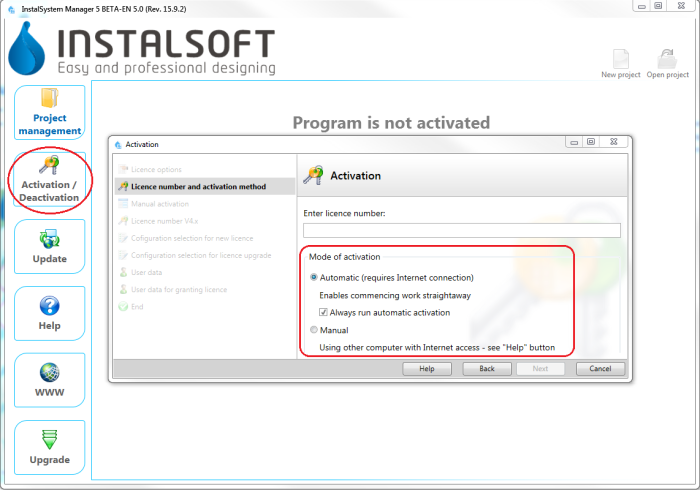
1. Activare - Actualizare - enables downloading the most recent version of the package, as well as some older versions. Programs and data catalogues are being constantly expanded and updated, and the modifications are published in the form of new package versions. It is recommended to regularly Actualizare the software and use the most recent available version. Actualizare is run from InstalSystem Manager 5 and is free of charge. InstalSystem Manager 5 has an option to notify the user about availabity of a newer program version. During Actualizare ii is possible to select and download several program versions, including archived versions. InstalSystem 5 has the unique feature of downloading and saving several versions of the program and using them simultaneously to process the projects. In particular it is possible to process archived projects using that program version which was used to create the project, and at the same time new projects can be created with the most recent program version.
Information on changes made in subsequent versions is provided in Release notes InstalSystem 5.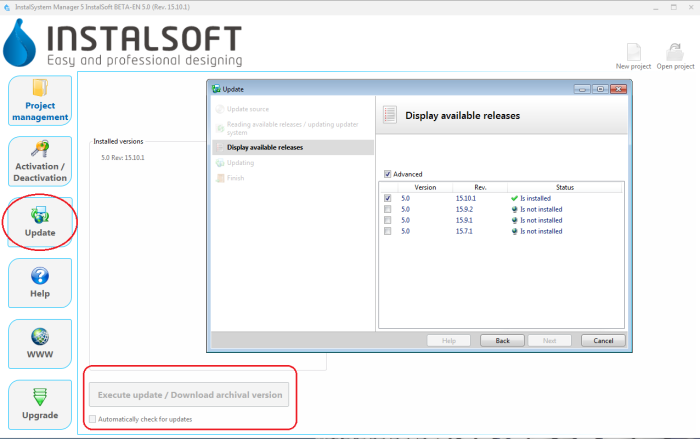
2. Update


EXAMPLE OF USE
Installation
Acquiring a licence number
Automatic Activare
Actualizare
Manual Activare